

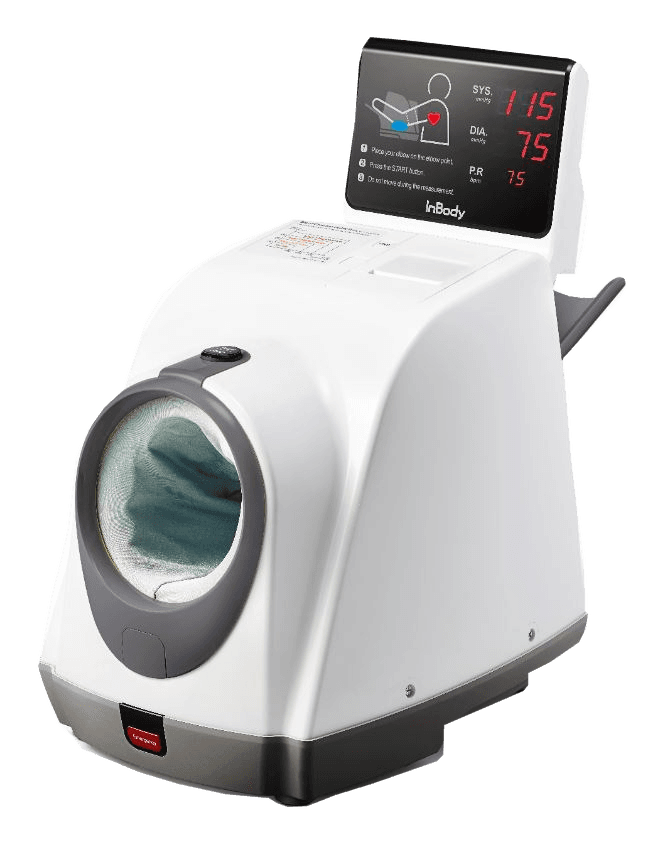
InBody BPBIO750
The BPBIO750 measures blood pressure and pulse with an upper-arm cuff. You sit for the test, with the device guiding arm placement. It adds another aspect to your InBody results: circulatory pressure, which muscle or fat quantity cannot tell you.
When this test is useful
You sit down, place your arm in the cuff and the monitor measures blood pressure and pulse. You get two pressure values and a pulse rate in beats per minute. Repeated readings let you see how pressure changes and discuss the results with a clinician when needed. The moving cuff, elbow support and spoken instructions help you find the right position. After rushing, coffee or exercise, your pressure can differ from a resting reading. Taking time to settle beforehand is worthwhile.
What the results tell you
SYS is systolic pressure when the heart contracts; DIA is diastolic pressure between beats. They appear as a pair in mmHg. Follow both values and compare readings taken under similar conditions. One higher reading does not establish hypertension.
Pulse tells you how many times per minute your heart beats during the reading. After stairs or rushing, it can be higher than after rest. It adds context to blood pressure; an ECG is used to assess heart rhythm.
MAP adds mean arterial pressure, PP is the difference between systolic and diastolic pressure, and RPP is systolic pressure multiplied by pulse rate. They offer more detail about the same reading. Start with systolic and diastolic pressure and pulse; discuss any additional values during your consultation.
How the device measures
As the cuff inflates, it records small pressure changes with each beat. The monitor uses these to calculate systolic and diastolic pressure. This common method used by automatic monitors is called oscillometry. BPBIO750 measures while the cuff is inflating.
Test procedure and preparation
Sit quietly for at least 5 minutes beforehand. Keep your back supported, feet flat and legs uncrossed. Support your arm so the cuff is at heart level, and avoid talking during the reading. Avoid smoking, caffeine and exercise for the preceding 30 minutes. Use the same arm next time.
Limitations and influences
Czech and global documents list an arm circumference of 17–42 cm; the US registration document lists 22–42 cm. Follow the manual for the actual device version. If it does not fit, another suitable monitor is needed. Rushing, talking and movement can affect the result, as can an uncomfortable position. One reading cannot show how your pressure behaves throughout the day. A clinician may recommend repeated home readings or all-day monitoring. The device does not record an ECG or explain the cause of elevated pressure or an irregular pulse.
Choosing a device and service
The monitor helps you follow blood pressure, InBody muscle and fat quantities, and InGrip grip strength. Max Pulse adds a different view of the pulse wave. Together they give you more information about your body; read each result in terms of what its device measures.
Specifications: InBody BPBIO750
- Recording time
- 20–50 s
- Device weight
- 7.1 kg
- Arm circumference for the cuff
- 17–42 cm
- Device pressure range
- 0–300 mmHg
- Pulse rate range
- 30–240 beats/min
- Method
- Inflationary oscillometry
- Declared pressure accuracy
- ±3 mmHg
- Declared pulse accuracy
- ±2%
Additional specifications · InBody BPBIO750
- Dimensions (width × depth × height)
- 299 × 547 × 485 mm
- Display
- LED display and thermal printer
- Documented interfaces
- RS-232C; USB with a dedicated cable
Where to get tested
Locations with a documented device. Each location detail describes its service and conditions.
Frequently asked questions
Does BPBIO750 measure pressure without a cuff?
No. It uses an upper-arm cuff and oscillometric calculation during inflation. Cuff fit and posture matter.
Does one reading establish hypertension?
No. Assessment uses repeated measurements and clinical context. One reading does not describe the whole day.
Sources and documentation
Show sources
- InBody: BPBIO750 — specifications and outputs
- BPBIO750: validation according to the AAMI/ESH/ISO Universal Standard
- American Heart Association: blood-pressure measurement instructions
- InBody / FDA — BPBIO750, K231174 (2023)
- InBody — Annual Report 2022, company history
- AHA — Measurement of Blood Pressure in Humans, 2019, Table 5